Samsung Clock
Screenshots
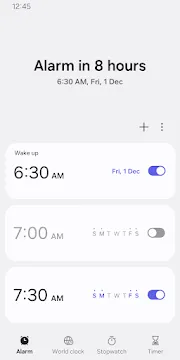
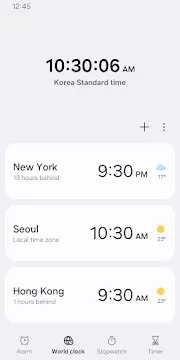
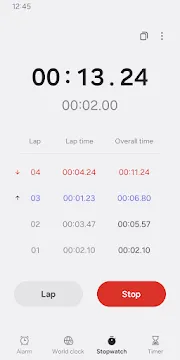
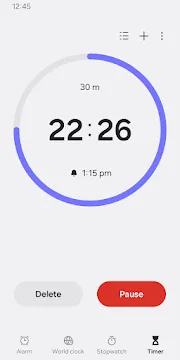
Samsung Clock is the primary time management tool for millions of Galaxy users. It goes beyond a simple alarm by providing a complete suite of features for daily organization. You can manage world time zones, track laps, and set precise countdowns with ease. The app is built to work seamlessly with the One UI interface, offering a clean and intuitive experience. Because it is a system app, it remains light on resources while staying highly responsive.
Efficient Time Management with Samsung Clock
Samsung Clock helps you stay on top of your schedule with its robust alarm system. You can create multiple alarms and customize each one with specific labels and sounds. The app allows you to skip a single day of a recurring alarm without turning it off entirely. This is perfect for holidays or unexpected days off. Furthermore, the snooze function is highly adjustable, letting you pick the interval that works best for your waking habits.
Advanced Customization in Samsung Clock
Personalization is a key part of the experience when using Samsung Clock. You can set your favorite Spotify playlists as your wake-up call to start your morning with music you love. If you prefer a more informative start, the app integrates with Bixby to read out the time and current weather over your alarm tone. The visual side is also customizable; you can change the background colors or use personal images for each alarm screen.
Global Connectivity through Samsung Clock
The world clock feature is essential for those who travel or work with international teams. You can add cities from across the globe to see their local time and weather conditions instantly. The app features an interactive globe and a time zone converter to help you plan meetings across different regions. This prevents confusion when scheduling calls with people in different parts of the world.
Precision Timing and Performance
The stopwatch and timer sections provide high accuracy for sports, cooking, or work tasks. You can record lap times during a run and copy those values directly to your clipboard for later analysis. The timer supports presets, so you can quickly start a countdown for common activities like boiling an egg or a quick workout. Because it supports multi-timer functionality, you can run several countdowns at once without any lag.
Smart Integration and Sleep Hygiene
Samsung Clock works with other system features to improve your sleep quality. The Bedtime mode helps you wind down by turning the screen to grayscale and silencing notifications during your rest hours. It tracks your sleep patterns and provides data to help you build better habits. The app also syncs with Galaxy Watches, allowing you to dismiss alarms or check timers right from your wrist.
Navigating the Modern Interface
The latest updates to the app focus on readability and ease of use. Large text and clear buttons ensure that you can operate the clock even when you are half-asleep. Transitioning between the four main tabs—Alarm, World Clock, Stopwatch, and Timer—is smooth and requires only a simple swipe. This logical layout makes it easy for anyone to find the tools they need within seconds.
Conclusion
Samsung Clock is a reliable and feature-rich application that simplifies how you track your day. It combines essential tools with smart features like Bixby integration and Spotify support. Whether you are managing global time zones or trying to wake up on time, this app provides the stability you need. Its clean design and deep integration with the Galaxy ecosystem make it a top choice for daily productivity.